The digital landscape is vast, and whether you're building the next big app or securing a complex network, you'll inevitably encounter IP addresses. But what happens when you need hundreds, thousands, or even millions of these addresses for testing? Manually typing them is out, and truly random, valid IP addresses are essential. This is where the art and science of generating IPv4 vs. IPv6 addresses randomly comes into play, offering a powerful solution for developers, testers, and security professionals alike.
Forget tedious manual entry or basic scripts that might accidentally produce invalid or non-compliant addresses. Modern IP address generators leverage cryptographically secure random number generation (CSPRNG) to deliver statistically uniform, valid IPs that adhere to strict standards like RFC 791 for IPv4 and RFC 4291 for IPv6. It’s about building trust in your test data and efficiency in your workflow.
At a Glance: Key Takeaways for Random IP Generation
- Why Random IPs? Essential for network testing, software development, security research, and API testing to simulate real-world scenarios.
- IPv4 vs. IPv6: Understand the fundamental differences (32-bit vs. 128-bit) and their implications for address space and generation.
- Trustworthy Generation: Tools use Cryptographically Secure Random Number Generation (CSPRNG) for truly random, statistically uniform, and valid addresses.
- Customization is Key: Generate specific quantities, define CIDR blocks or IP ranges, and exclude private or localhost addresses.
- Unique vs. Non-Unique: Choose between ensuring distinct addresses or allowing duplicates for specific testing needs like load simulation.
- Reproducibility: Use an optional seed to recreate the same sequence of random IPs, invaluable for debugging and consistent testing.
- Output Flexibility: Export results in common formats like TXT, CSV, or JSON for easy integration into your existing tools.
The Imperative of Random IP Addresses: Beyond Theory to Practicality
In an interconnected world, IP addresses are the bedrock of communication. But why would you need to generate them randomly? The answer lies in the dynamic and often unpredictable nature of real-world networks and applications. When you're building a system, you don't just test it with a handful of known IPs; you need to simulate diverse traffic, edge cases, and scale.
Think about it:
- Network Testing: How do you test firewall rules, routing configurations, or access control lists against a wide spectrum of potential source or destination IPs without an exhaustive list? Random generation provides the breadth you need.
- Software Development: Populating test databases with realistic "user" data often requires unique IP entries. Simulating thousands of concurrent user connections for load testing might involve a multitude of IPs, some potentially duplicated to mimic large internal networks.
- Security Research: Penetration testers and vulnerability scanners need to simulate attacks from various IP sources, often requiring a range of non-existent but valid addresses to probe system resilience.
- Log Analysis & SIEM: Testing your Security Information and Event Management (SIEM) system's ability to parse, correlate, and alert on traffic from diverse IP sources requires varied input.
- API Testing: Testing geolocation services, rate limiting, or country-specific content delivery often means simulating requests from many different "locations" represented by IPs.
In each scenario, the quality of your testing is directly tied to the quality and randomness of your simulated data. A robust IP generator ensures this data is valid, compliant, and truly random, giving you confidence in your testing outcomes. If you're looking for a quick and reliable way to get started, you can Generate a random IP address right now with dedicated tools.
IPv4 vs. IPv6: Understanding the Core Differences for Random Generation
Before diving into how addresses are generated, it’s crucial to grasp the fundamental distinctions between IPv4 and IPv6. These differences profoundly impact the generation process and the resulting address space.
IPv4: The Familiar 32-bit Workhorse
IPv4 addresses are likely what most people envision when they think of an IP. They are 32-bit numbers, typically represented in dot-decimal notation (e.g., 192.168.0.1).
- Structure: Four octets (8-bit segments), separated by periods. Each octet ranges from 0 to 255.
- Address Space: Offers approximately 4.3 billion unique addresses ($2^{32}$). While seemingly large, this pool has been largely exhausted, leading to the development of IPv6.
- Generation Implication: Generating a random IPv4 address involves essentially picking four random numbers between 0 and 255 and combining them, with careful consideration for reserved and private ranges.
IPv6: The Future-Proof 128-bit Expander
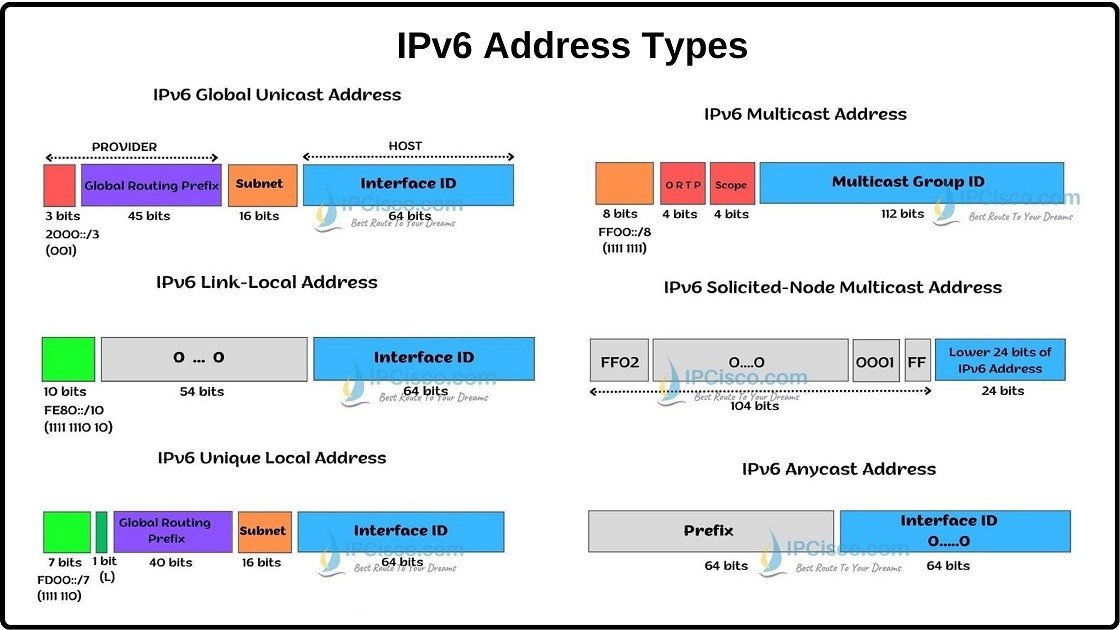
IPv6 addresses are the next-generation protocol, designed to solve the address exhaustion problem and offer enhanced features. They are 128-bit numbers, far more complex in appearance (e.g., 2001:0db8:85a3:0000:0000:8a2e:0370:7334, often abbreviated to 2001:db8::1).
- Structure: Eight 16-bit hexadecimal segments (hextets), separated by colons. Each segment can range from
0000toFFFF. The::notation can be used once to represent consecutive blocks of zeros. - Address Space: Boasts an astronomical $3.4 \times 10^{38}$ (340 undecillion) unique addresses ($2^{128}$). This effectively provides an inexhaustible supply for the foreseeable future.
- Generation Implication: Generating random IPv6 addresses requires selecting eight random 16-bit hexadecimal values, adhering to specific formatting rules, and being aware of various special-purpose prefixes and ranges. The sheer size of the address space means true randomness is critical to avoid bias.
Why the Distinction Matters for Random Generation:
When you're generating IPv4 vs. IPv6 addresses randomly, the choice of protocol isn't just a technical detail; it's a strategic decision. - Address Volume: If you need a truly massive number of unique addresses, IPv6 is your only viable option.
- Format Compatibility: Your testing environment or application will likely be designed for one or both. Generating the wrong version can break your tests.
- Network Reality: Many networks still primarily use IPv4, often with NAT. Others are dual-stack or have fully embraced IPv6. Your generated IPs should reflect the reality of the networks you're testing.
Under the Hood: How a Random IP Address Generator Works
The magic behind a reliable IP address generator isn't really magic at all; it's robust computer science built on well-established standards.
At its core, such a tool relies on Cryptographically Secure Random Number Generation (CSPRNG). This isn't your average rand() function. CSPRNGs are designed to produce sequences of numbers that are not only statistically random (meaning each number has an equal chance of appearing) but also unpredictable, even if an attacker knows previous outputs. This is vital for security-related testing where predictability could be a vulnerability.
Here’s a simplified breakdown of the process:
- Seed Initialization (Optional): If you provide a seed, the CSPRNG starts its sequence from a predictable point. Without a seed, it often draws entropy from system events (like mouse movements, disk I/O, or CPU temperature) to ensure true, non-reproducible randomness.
- Raw Bit Generation: The CSPRNG produces a stream of high-quality random bits – 32 bits for IPv4, 128 bits for IPv6.
- Address Assembly:
- IPv4: The 32 random bits are segmented into four 8-bit octets. Each octet is converted into its decimal equivalent (0-255) and assembled into the
A.B.C.Dformat. - IPv6: The 128 random bits are segmented into eight 16-bit hextets. Each hextet is converted into its hexadecimal equivalent (e.g.,
0000-FFFF) and assembled into theAAAA:BBBB:CCCC:DDDD:EEEE:FFFF:GGGG:HHHHformat, with potential for::abbreviation.
- Validation and Filtering: This is where compliance comes in.
- The generated raw address is checked against RFC 791 (IPv4) and RFC 4291 (IPv6) to ensure it's a syntactically valid IP address.
- Exclusions: If selected, specific address ranges are filtered out:
- Private IPv4 Ranges (RFC 1918):
10.0.0.0/8,172.16.0.0/12,192.168.0.0/16. - Localhost/Loopback:
127.0.0.0/8for IPv4,::1for IPv6. - Reserved Blocks: Other ranges designated for special purposes (e.g., multicast, future use).
- Uniqueness Check: If "Unique" mode is active, the generated IP is compared against all previously generated IPs. If a duplicate is found (and it's not a valid duplicate in a "Non-Unique" scenario), the process loops to generate a new IP.
- Output: Once validated and filtered, the IP address is added to the result set. This process repeats until the desired quantity of addresses is generated.
This meticulous process ensures that the IPs you receive are not just random numbers, but legitimate addresses fit for purpose, avoiding common pitfalls and ensuring your testing environments are as realistic and robust as possible.
Features That Define a Powerful Random IP Generator
A great random IP address generator isn't just about pressing a button. It offers a suite of features designed to give you precise control over your generated data, making it adaptable to nearly any testing scenario.
1. IP Version Selection: Your Protocol, Your Choice
This is fundamental. Whether you need IPv4, IPv6, or a mix of both, the tool should allow you to specify the desired protocol.
- IPv4 (32-bit): Ideal for testing legacy systems, internal networks, or when your target environment is predominantly IPv4. You'll see familiar formats like
192.168.0.1. - IPv6 (128-bit): Essential for future-proofing, testing modern applications, or when you need a vast number of unique addresses. Examples include
2001:db8::1. - Both: Some scenarios require a blend, allowing you to generate a diverse set for dual-stack environments.
2. Quantity Control & Input Flexibility: Precision at Scale
You rarely need just "some" IPs. You need a specific number, or IPs from a particular segment.
- Fixed Quantity: Generate anywhere from 1 to 100+ addresses with a simple slider or input box.
- CIDR Blocks (e.g.,
192.168.1.0/24): This is where real power comes in. You can specify a network range using CIDR notation and then request a certain number of random IPs within that specific subnet. For instance,192.168.1.0/24 x 10would yield 10 random IPs exclusively from the192.168.1.xnetwork. This is incredibly useful for testing subnet-specific firewall rules or access controls. - IP Ranges (e.g.,
10.0.0.1-10.0.0.50): Similar to CIDR, but you define a specific start and end IP. This offers granular control, allowing you to target very specific segments of an address space, perhaps mimicking known host ranges. - Flexible Delimiters: Tools often support various ways to specify counts per range, like
192.168.1.0/24 x 5,10.0.0.1-10.0.0.50 10, or[2001:db8::/64] 25.
3. Exclusion Options: Avoiding the Unwanted
Not all valid IP addresses are useful for every test. Sometimes, you need to exclude specific categories.
- Private IP Exclusion (IPv4 only): This feature prevents the generation of IPs from RFC 1918 private ranges:
10.0.0.0/8,172.16.0.0/12, and192.168.0.0/16. These are reserved for local networks and are not routable on the public internet. Excluding them is crucial when testing public-facing services or simulating external traffic. To delve deeper into these specific ranges, you might want to learn more about private IP ranges and their designated uses. - Localhost Exclusion: This option skips loopback addresses (
127.0.0.0/8for IPv4 and::1for IPv6). These addresses always point back to the local machine and are rarely useful for simulating external network traffic.
4. Uniqueness Control: Tailoring to Your Test
Do you need every single generated IP to be distinct, or are duplicates acceptable (or even desired)?
- Unique Mode: Ensures every IP in your output is distinct. This is critical for populating databases, assigning unique identifiers, or any scenario where each IP must represent a different entity. Be aware that for very small ranges with large requested quantities, generating unique IPs can become slow as the tool searches for available unused addresses.
- Non-Unique Mode: Allows for duplicate IPs. This is perfect for load testing, where many "users" might originate from a single internal network IP (due to NAT), or for simulating highly repetitive traffic patterns.
5. Reproducible Randomness (Seeding): Debugging with Confidence
True randomness is great for real-world simulation, but awful for debugging.
- Optional Seed: By providing an optional numerical or string "seed," you can instruct the CSPRNG to start its sequence from a specific point. This means that every time you use the same seed, you'll get the exact same sequence of "random" IP addresses. This feature is invaluable for:
- Debugging: Reproduce a bug that only appeared with a specific set of IPs.
- Consistent Testing: Ensure that different test runs use identical input data for comparative analysis.
- Collaboration: Share a seed with teammates to ensure everyone is testing with the same data.
6. Output Options: Integrate with Ease
Once generated, you need to use the data.
- Formats: Export generated IPs in common formats like plain TXT, structured CSV, or machine-readable JSON.
- Summary Statistics: Get a quick overview of your output, including the total number of IPs generated and how many of them are unique.
These features transform a simple random number generator into a specialized, indispensable tool for anyone working with network infrastructure or software development.
A Step-by-Step Guide: Generating Your First Batch of Random IPs
Using a robust IP address generator is often intuitive, but following these steps will ensure you leverage its full potential.
- Choose Your IP Version(s):
- Locate the "IP Version" or "Protocol" selection.
- Select IPv4, IPv6, or both, depending on your testing needs. For general development, IPv4 is often sufficient, but for forward-thinking applications, IPv6 is essential.
- Define Your Quantity or Network/Range:
- Simple Quantity: If you just need a fixed number of general IPs (e.g., 25 random IPv4s), input the desired count directly.
- Specific Networks/Ranges: For more precise control, use the input field for CIDR blocks or IP ranges.
- Example (IPv4 CIDR):
192.168.1.0/24 x 10(generate 10 IPs from this subnet). - Example (IPv4 Range):
10.0.0.100-10.0.0.150 x 5(generate 5 IPs within this range). - Example (IPv6 CIDR):
2001:db8::/64 x 20(generate 20 IPs from this IPv6 prefix).
- Configure Exclusion Options:
- Private IP Exclusion: If testing public-facing services, tick the box to "Exclude Private IPv4 Ranges" to ensure only public-routable IPv4s are generated.
- Localhost Exclusion: For most network testing, you'll want to "Exclude Localhost/Loopback Addresses" to avoid including
127.0.0.1or::1.
- Select Uniqueness Mode:
- Unique: Choose "Unique" if you need every IP to be distinct (e.g., for populating a user database). Remember this can be slower for very large counts within small ranges.
- Non-Unique: Select "Non-Unique" for scenarios like load testing where duplicates are acceptable or desired.
- Optional: Provide a Seed for Reproducibility:
- If you need to generate the exact same sequence of random IPs again in the future (for debugging or consistent testing), enter a specific string or number into the "Seed" field. Leave it blank for truly fresh randomness.
- Generate!
- Click the "Generate" or similar button.
- The tool will process your request, display the generated IPs, and often provide summary statistics (total IPs, unique IPs).
- Export Your Results:
- Select your preferred output format (TXT, CSV, JSON) and download the file. This makes integration into scripts, databases, or other tools seamless.
By following these steps, you can quickly and reliably generate the precise IP address data you need for any development, testing, or security project.
Best Practices and Pitfalls to Avoid When Generating Random IPs
While powerful, a random IP generator is a tool, and like any tool, it's most effective when used correctly. Here are some best practices and common pitfalls to navigate.
Best Practices:
- Match IPs to Your Environment: Always consider the target system. If you're testing an IPv4-only legacy system, generating IPv6 addresses will be useless. If you're on the bleeding edge of IoT, IPv6 is likely your best bet.
- Use Exclusions Strategically:
- Public vs. Private: If simulating external internet traffic, always exclude private IPv4 ranges. If simulating internal network activity, you might want to include them.
- Loopback: Most network tests benefit from excluding localhost.
- Leverage CIDR/Range Generation for Targeted Testing: Don't just generate global random IPs if you're testing a specific subnet. Using CIDR blocks allows you to test internal routing, access controls, or network segmentation with precision.
- Uniqueness Matters for Data Integrity: When populating databases or assigning distinct identities, "Unique" mode is non-negotiable. It prevents conflicts and ensures your test data accurately reflects distinct entities.
- Embrace Seeding for Repeatable Tests: Make reproducible randomness a habit for critical tests. Document the seed used for each test run, especially when debugging. This saves immense time and frustration.
- Understand Performance Implications: "Unique" mode on small ranges with large quantities can be slow. If you need 100 unique IPs from a
/30(only 4 addresses total), the tool will struggle and might loop endlessly if only 4 are possible. Be reasonable with your requests. - Review Summary Statistics: Always check the "Total IPs" vs. "Unique IPs" count. If you requested unique IPs but the unique count is lower than expected, it might indicate a very constrained range or a bug in your logic.
- Security First: Remember that these tools generate valid IP addresses. Never use randomly generated IP addresses to conduct unauthorized scans, attacks, or any malicious activity against real, production systems. Restrict their use to authorized testing, development, and educational environments.
Pitfalls to Avoid:
- Ignoring IP Version Mismatch: Generating IPv6 for an IPv4-only application will lead to immediate failure and wasted effort.
- Forgetting Private IP Exclusion for Public Tests: This can lead to your testing data containing addresses that are never actually routed on the public internet, making your simulations unrealistic.
- Over-relying on Global Randomness: If your system has specific network constraints or requirements, simply generating "any" random IP won't give you robust testing. Use CIDR/range inputs for realism.
- Neglecting Uniqueness When Required: If your application expects unique identifiers and you're feeding it duplicate IPs, you're likely creating false positives or missing critical bugs related to data integrity.
- Assuming "Random" Means "Valid": A simple
rand()function won't necessarily produce valid, RFC-compliant IP addresses or correctly handle exclusions. Always use a specialized IP generator that validates its output. - Not Documenting Seeds: If you use a seed for a critical test and don't document it, you lose the ability to reproduce the exact test scenario, which defeats the purpose of seeding.
- Using Generated IPs Maliciously: This is a crucial ethical and legal consideration. Generated IPs are for authorized testing and development within controlled environments. Misuse can lead to severe consequences.
By adhering to these best practices and being aware of potential pitfalls, you can harness the full power of random IP address generation to build, test, and secure your systems with confidence.
Common Questions and Misconceptions About Random IP Generation
Let's address some frequently asked questions and clear up common misunderstandings to ensure you're fully equipped.
Q: Is "random" truly random in this context?
A: Yes, when a tool uses Cryptographically Secure Random Number Generation (CSPRNG), it means the numbers are statistically uniform and unpredictable. This is a higher bar than basic pseudo-random number generators, making the generated IPs suitable even for security testing.
Q: Can I generate MAC addresses randomly too?
A: While related to networking, MAC addresses (Media Access Control) are distinct from IP addresses. Most IP generators focus solely on IPs, but specialized tools exist for generating random MAC addresses.
Q: Why would I want to generate non-unique IPs? Isn't uniqueness always better?
A: Not always! For load testing, you might want to simulate a scenario where many users are coming from a limited pool of source IPs (e.g., behind a NAT gateway in a large enterprise). In such cases, non-unique IPs more accurately reflect real-world network traffic patterns.
Q: What's the biggest challenge when generating IPv6 addresses randomly compared to IPv4?
A: The sheer size of the IPv6 address space ($2^{128}$) is the primary difference. While this means virtually unlimited addresses, it also means true random generation is even more critical to avoid accidentally favoring specific small ranges if the randomness isn't high quality. The complex hexadecimal notation also requires careful formatting.
Q: Are there any legal or ethical concerns with generating IP addresses?
A: Yes, absolutely. Generating IP addresses is perfectly fine. The concern arises when you use those generated IPs. You must only use them for authorized testing, development, and educational purposes within controlled environments. Attempting to use them to scan, probe, or attack systems you do not have explicit permission to test is illegal and unethical. Treat generated IPs like any other network tool: use it responsibly.
Q: Can I use this to find available IP addresses on the internet?
A: No, that's not its purpose. While it generates valid addresses, it doesn't check for their real-world availability or connectivity. Doing so without authorization constitutes network scanning, which is often illegal or prohibited. This tool is for creating mock data for testing your own systems.
Q: Why do I sometimes get fewer unique IPs than I requested when using "Unique" mode?
A: This usually happens when you request a very large number of unique IPs from a very small or constrained range (e.g., asking for 100 unique IPs from a /30 CIDR block, which only has 4 usable addresses). The generator will try its best but can only provide as many unique IPs as mathematically possible within the defined constraints.
Moving Forward: Empowering Your Development and Testing Journey
Whether you're a network engineer stress-testing a new firewall, a developer populating a test database for an application designed to scale globally, or a security researcher probing for vulnerabilities, the ability to effectively generate IPv4 vs. IPv6 addresses randomly is a fundamental skill.
By understanding the underlying mechanisms, leveraging the powerful features of dedicated generation tools, and adhering to best practices, you equip yourself with a critical capability. This isn't just about creating random strings; it's about building confidence in your systems, ensuring their robustness, and preparing them for the diverse, dynamic, and often unpredictable world of internet traffic. Go forth and generate, test, and build with purpose!