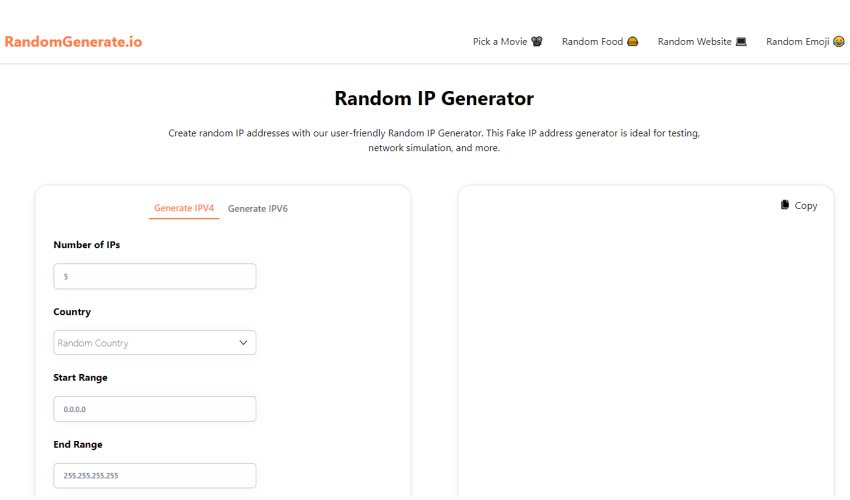
Getting your network up and running or robustly testing a new application often requires more than just a few static IP addresses. Sometimes, you need a whole arsenal of valid, yet entirely random, IPs to simulate real-world scenarios, test security, or simply fill mock data. This is where online random IP address generator tools become indispensable. But with so many options, how do you sort through them to find the best fit for your specific needs? This guide offers a comprehensive look at the Top Online Random IP Address Generator Tools Compared by their features, usability, and underlying mechanics, ensuring you make an informed choice.
At a Glance: Key Takeaways
- Essential for Professionals: Developers, testers, network admins, and security pros heavily rely on these tools for a myriad of tasks.
- Two Core Types: Generators handle both IPv4 (e.g., 192.168.1.1) and IPv6 (e.g., 2001:db8::1) addresses.
- Crucial Use Cases: From network and security testing to software debugging and maintaining privacy, random IPs are vital.
- Key Features Matter: Look for customizable ranges (public/private, CIDR), bulk generation, export options, and client-side processing for privacy.
- Simplicity is Key: The best tools offer intuitive interfaces, making complex tasks straightforward.
Why You'll Reach for a Random IP Address Generator (And Why It's More Than Just a Number)
Think of a random IP address generator not just as a number cruncher, but as a strategic asset in your digital toolkit. In the intricate world of networking and software development, the need for diverse, valid IP addresses is constant. Whether you’re trying to stress-test a server or secure a complex system, static, predictable IPs just won't cut it.
Let's unpack the critical scenarios where these generators shine:
- Network Testing & Configuration Validation: Imagine you're rolling out a new firewall rule or configuring a complex VPN. Manually creating hundreds of unique IP addresses to test every permutation of your setup would be a nightmare. Random generators automate this, letting you simulate varied traffic sources to ensure your network devices, from routers to proxies, behave exactly as expected under diverse conditions.
- Security Audits & Penetration Testing: For ethical hackers and security professionals, simulating attacks is a daily task. Random IPs allow you to mimic distributed denial-of-service (DDoS) attacks, probe for vulnerabilities from different "sources," or test the efficacy of intrusion detection systems without using real, identifiable addresses. This controlled environment is crucial for validating your defenses.
- Load Testing for Performance: Websites and applications need to scale. To understand how your server performs under heavy loads, you need to simulate many concurrent users. Each simulated user often requires a unique IP to mimic distinct connections. Generators provide the volume of addresses needed to push your systems to their limits, revealing bottlenecks before they impact real users.
- Privacy & Anonymity in Data Handling: When working with sensitive log data or performing large-scale data analysis, privacy is paramount. Generating random, non-identifiable IP addresses allows you to anonymize logs, mask real identities for testing purposes, or replace sensitive information in datasets without compromising analytical integrity. It��s a vital step in maintaining data privacy compliance.
- Software Testing & Development Debugging: Developers frequently need mock data. Whether populating a database field that expects an IP address, simulating various client connections to an API, or debugging DHCP and subnet issues, random IPs provide the necessary data points. This accelerates the debugging process and ensures your application handles diverse network inputs gracefully.
- Network Simulation & Virtual Environments: Tools like Wireshark or Cisco Packet Tracer thrive on realistic data. When building virtual networks for training or complex simulations, generating a range of IPs allows you to create authentic scenarios, such as modeling distributed systems or testing routing protocols in a safe, sandboxed environment.
- Web Scraping & Data Collection: For tasks involving automated data collection from websites, rapidly rotating IP addresses is a common strategy to avoid detection and blocking. Random IP generators can feed a proxy rotator with a fresh stream of valid addresses, helping your scraping operations remain anonymous and uninterrupted.
- Compliance & Data Privacy Regulations: With regulations like GDPR and CCPA, testing systems with real user data carries significant risk. Random IP addresses provide a safe, compliant way to test data pipelines, anonymization routines, and privacy controls, ensuring your systems meet legal requirements without exposing actual user information.
These aren't just theoretical benefits; they are practical necessities that save time, reduce risk, and enhance the quality of your work.
Decoding IP Addresses: A Quick Refresher for Practical Use
Before you start generating, a quick grasp of the basics will help you configure your random IP tool effectively. Don't worry, we'll keep it focused on what matters for these generators.
- IP Addresses: Your Device's Digital Fingerprint: At its core, an IP address is a unique numerical identifier assigned to every device connected to a computer network that uses the Internet Protocol for communication. Think of it as a street address for your computer on the digital highway.
- IPv4: The Classic (and Crowded) Standard: You're most familiar with IPv4 addresses, which are 32-bit numbers usually displayed as four decimal numbers (0-255) separated by periods – like
192.168.1.1. While widely used, the address space is finite and rapidly depleting, leading to the rise of its successor. - IPv6: The Future-Proof Solution: IPv6 is a 128-bit address, offering an astronomically larger address space. It's displayed in a hexadecimal format with groups separated by colons, such as
2001:0db8:85a3::8a2e:0370:7334. The::is a special notation to compress successive groups of zeros, making them more readable. - Private IP Ranges (RFC 1918): Staying Local: Not all IP addresses are meant for the public internet. Private IP ranges are non-routable addresses designated for internal networks (like your home Wi-Fi). The most common are:
10.0.0.0/8(e.g.,10.1.2.3)172.16.0.0/12(e.g.,172.16.0.1to172.31.255.254)192.168.0.0/16(e.g.,192.168.1.1)
These are crucial for setting up mock internal networks without interfering with public IPs.- CIDR (Classless Inter-Domain Routing): Defining Your Digital Neighborhood: CIDR is a smarter way to allocate IP addresses and route traffic. Instead of fixed "classes," it uses a suffix (like
/24or/16) to indicate the number of bits used for the network portion of the address. For example,192.168.1.0/24specifies a network where the first 24 bits are fixed, leaving 8 bits for host addresses (256 possible IPs). This is invaluable for defining custom subnets for testing.
Understanding these terms empowers you to direct your random IP generator precisely, creating addresses that fit your specific testing or development needs.
How These Generators Work Their Magic (Under the Hood)
Ever wondered how an online tool can instantly spit out a stream of valid, random IP addresses? It’s not just pulling numbers out of a hat. These tools employ a systematic and robust process to ensure the addresses are both random and usable.
- The Engine: Secure Random Number Generation: At the heart of any reliable IP generator is a high-quality random number generator (RNG). For security-sensitive applications, this is typically a cryptographically secure random number generator (CSPRNG), often utilizing browser-native functions like
crypto.getRandomValues()for strong unpredictability.
- For IPv4: The RNG generates four separate 8-bit numbers (octets), each ranging from 0 to 255.
- For IPv6: It generates a 128-bit value, which is then divided into eight 16-bit hexadecimal groups. The sheer scale of IPv6 makes true "randomness" in the entire address space much more feasible.
- The Rulebook: Validity & Standards Adherence: Random doesn't mean anything goes. After generation, each potential IP address is immediately validated against established RFC (Request for Comments) standards. This ensures:
- Correct Formatting: Dotted-decimal for IPv4, colon-separated hexadecimal for IPv6.
- Valid Ranges: Numbers must fall within the permissible range for each octet or hex group.
- Avoiding Reserved Addresses: Crucially, good generators will, by default, avoid commonly reserved or special-use addresses that are non-routable or have specific functions (e.g.,
127.0.0.0/8for loopback,0.0.0.0/8for current network, multicast ranges). This prevents you from generating unusable IPs for most practical applications.
- The Customizer: Applying Your Criteria: This is where the tool adapts to your selections.
- If you choose IPv4 or IPv6, the generation method and validation rules adjust accordingly.
- If you specify public or private addresses, the tool constrains its random number generation to fall within those defined ranges (e.g.,
10.0.0.0/8for private). - If you input a custom subnet using CIDR (e.g.,
192.168.1.0/24), the generator applies subnet masking (a bitwise AND operation) to ensure all generated IPs fall within that specific network. This means the network portion of the address remains constant, while only the host portion is randomized.
- The Presenter: Output Formatting: Finally, the validated and customized IP addresses are formatted into their standard, readable representations. For IPv6, this often includes "::" compression to shorten long strings of zeros, making the output cleaner and easier to work with.
This meticulous process ensures that every IP address you generate is not only random but also technically valid and perfectly suited for your specified use case.
What Makes a Great IP Address Generator Tool? Key Features to Look For
When you're sifting through online tools to generate random IP addresses, it's not just about getting an IP. It's about getting the right IP, quickly and efficiently. Here’s a breakdown of the critical features that distinguish a truly useful generator:
- Dual-Stack Support (IPv4 and IPv6): This is non-negotiable. Modern networks are a mix of both, and your generator should seamlessly handle either or even a mixed generation for comprehensive testing scenarios. Look for clear options to switch between or select both.
- Customizable IP Range & Subnet Control:
- Public vs. Private: The ability to specify whether you want addresses from the internet-routable public space or the internal-network-only private (RFC 1918) ranges. This is fundamental for appropriate testing environments.
- Custom CIDR Input: For granular control, the option to define a specific subnet (e.g.,
192.168.1.0/24) is invaluable. This ensures all generated IPs belong to a designated network segment, perfect for targeted subnet testing. - Start/End Range: Sometimes you need IPs within a very specific block. The flexibility to input a custom start and end IP address (or even a range of octets/hex groups) offers precise control.
- Bulk Generation Capabilities: Generating one IP at a time is inefficient. A top-tier tool lets you specify the quantity – from a handful to thousands – and generates them almost instantly. This is crucial for load testing, large-scale simulations, or populating extensive datasets.
- Instant Results & Real-Time Validation: You shouldn't have to wait. The best generators provide immediate results on the screen, often with built-in validity checks to confirm the addresses are correctly formatted and fall within the expected parameters. This real-time feedback saves debugging time.
- Flexible Export Options: Once you have your list of IPs, how do you get them into your scripts or spreadsheets? Look for tools that offer:
- Copy to Clipboard: The fastest way to grab a few IPs.
- Downloadable Files: Essential for bulk generation. Common formats include plain text (
.txt), CSV (.csv) for spreadsheet import, and JSON (.json) for programmatic use. - Client-Side Operation & Privacy: This is a huge differentiator for trustworthiness. Many reputable tools perform all generation logic directly in your browser using JavaScript. This means no data is sent to a server, processed externally, or stored. It ensures maximum privacy and speed, as your generated IPs never leave your machine.
- User-Friendly Interface (UI): No one wants to decipher a complex UI just to get a few IPs. An intuitive, clean, and well-labeled interface that guides you through the options without requiring a manual is a hallmark of a great tool.
- Advanced Capabilities (Bonus Points):
- MAC-IP Pairing: For network configuration testing, generating a corresponding MAC address alongside an IP can be extremely useful.
- Sequential Generation: While primarily "random," some tools offer an option for sequential IPs within a range, useful for specific testing patterns.
- CIDR Validation: Tools that can validate whether your custom CIDR input is correct further enhance usability and prevent errors.
- Exclusion Lists: The ability to explicitly exclude certain IPs or ranges from generation (beyond the default reserved ones) offers even finer control.
Prioritizing these features will help you identify a robust and reliable random IP generator that genuinely enhances your workflow, rather than just adding another tab to your browser.
Your Step-by-Step Guide to Generating Random IPs (It's Easier Than You Think)
Using an online random IP address generator is remarkably straightforward, designed to be accessible even if you're not a network guru. Here's a typical workflow you can expect:
- Head to Your Chosen Tool: Navigate to the online generator of your choice. A quick search for "random IP address generator" will yield many options.
- Specify the Quantity: The first and often most prominent input field will ask for the "Number of IPs to Generate" or "Quantity." Enter how many unique IP addresses you need. This could be as few as 1 or as many as 10,000+.
- Select Your IP Version: Look for radio buttons or a dropdown menu labeled "IP Version," "IP Type," or similar.
- Choose IPv4 if you need the traditional dotted-decimal format.
- Select IPv6 for the hexadecimal format.
- Some tools offer a Mixed option, generating a combination of both.
- Configure Your Range & Restrictions (The Smart Part): This is where you fine-tune the randomness.
- Public vs. Private: You'll typically find checkboxes or options to select "Public IPs" or "Private IPs (RFC 1918)." Choose private if you're simulating an internal network.
- Custom Range (Start/End): If you need IPs within a very specific block, enter a "Start IP" and an "End IP" (e.g.,
192.168.1.1to192.168.1.254). - Custom Subnet (CIDR): For precise network segments, locate the "Custom Subnet" or "CIDR" input. Enter your CIDR notation (e.g.,
10.0.0.0/24). The generator will ensure all IPs fall within this defined subnet. - Pro Tip: Default settings usually exclude reserved and special-use addresses, which is generally what you want.
- Choose Your Output Format (Optional but Useful): Some generators offer additional formatting options:
- Decimal, Binary, Hexadecimal: How the numbers themselves are represented. For IPs, stick to standard decimal (IPv4) or hexadecimal (IPv6) unless you have a specific low-level testing need.
- MAC Pairing: If available, check this box to generate a random MAC address alongside each IP, useful for deeper network testing.
- Click "Generate"! Once all your parameters are set, hit the "Generate," "Get IPs," or "Randomize" button. The results should appear almost instantly.
- Review & Export Your IPs:
- Instant Results: A list of generated IP addresses will populate on the screen. Take a moment to visually confirm they meet your criteria (e.g., look like IPv4, fall in your custom range).
- Validation Check: Good tools will often indicate if any generated IPs are invalid or duplicates, though with truly random generation, duplicates are rare unless you're requesting a huge number from a small pool.
- Copy or Download:
- Click "Copy to Clipboard" for a quick transfer.
- Choose "Download as TXT," "Download as CSV," or "Download as JSON" for larger lists, saving them directly to your computer.
And that's it! In just a few clicks, you've gone from zero to hundreds or thousands of valid, random IP addresses, ready for your next project.
Comparing the Top Contenders: What to Consider Beyond the Basics
While we won't name specific tools, understanding the key differentiators will help you evaluate any online random IP generator effectively. When you're assessing tools advertised as the "Top Online Random IP Address Generator Tools Compared," consider these aspects:
- User Interface and Experience (UI/UX):
- Clarity: Is it easy to understand what each option does? Are labels unambiguous?
- Speed: How quickly do results appear after clicking "Generate"?
- Responsiveness: Does the site work well on different devices (desktop, mobile)?
- Clutter: Is the page filled with excessive ads or unnecessary elements that distract from the core function? A clean, minimalist design often indicates a focus on user experience.
- Feature Set vs. Your Needs:
- Core Functionality: Does it offer both IPv4 and IPv6, and the crucial range customization (public/private, CIDR)? If not, it's likely not comprehensive enough.
- Advanced Options: Do you need MAC address generation, sequential IPs, or an exclusion list? If so, look for tools that offer these specific extras. Don't pay for features you don't need, but ensure critical ones are present.
- Output Formats: If you work extensively with data, CSV and JSON export options are non-negotiable. For simple copying, plain text is fine.
- Underlying Technology and Privacy (Crucial for Trust):
- Client-Side Processing: This is paramount. Can you confirm (often through a discreet note on the page or by checking your browser's developer tools for network activity) that the generation happens entirely in your browser? If so, your data (even randomly generated IPs) isn't being sent to a server, ensuring privacy and typically faster results.
- Randomness Source: While most will use
Math.random()orcrypto.getRandomValues()(the latter being superior for cryptographic strength), a tool that explicitly mentions using a cryptographically secure source adds a layer of trust, especially for security-related testing. - Reputation and Credibility:
- Authority: Is the tool part of a larger, reputable suite of networking utilities? Or is it a standalone, ad-heavy site?
- Community Feedback: While harder to gauge for simple tools, a quick search might reveal mentions or reviews if a tool has a particularly good or bad reputation.
- Updates: Does the tool look maintained? Outdated interfaces or broken features can indicate neglect.
By comparing tools against these practical criteria, you can quickly identify which one aligns best with your technical requirements, privacy concerns, and overall workflow efficiency. Always prioritize functionality and privacy over flashy aesthetics.
Beyond the Basics: Advanced Tips & Best Practices
Generating random IPs is simple, but using them effectively sometimes requires a little extra thought. Here are some advanced tips and best practices to keep in mind:
- Validate Your IPs (Beyond the Generator's Check): While generators ensure syntactical correctness, for critical network testing, always run a sample of your generated IPs through a manual verification process. This might involve pinging a few (if public and routable), checking their allocation status using
whoisqueries, or confirming they adhere to any highly specific internal network rules you might have. This extra step prevents false positives in your testing. - Understand Scope and Scale:
- Limited vs. Broad Ranges: When testing specific subnet configurations, stick to tight CIDR ranges. For broader simulations (like general internet traffic), use public IPv4 or IPv6 with minimal range restrictions.
- Quantity vs. Quality: For load testing, sheer quantity might be key. For security audits, a smaller set of highly targeted IPs (e.g., from specific geographical regions or known malicious ranges, if you're simulating real threats) might be more effective.
- Don't Use Random IPs for Production: It might seem obvious, but random IP addresses are for testing and simulation, not for assigning to live production servers or critical network devices. Real production systems require carefully planned, static, and often public IP assignments for reliability and routing stability.
- Integrate with Automation: The true power of bulk IP generation comes when integrated into your automation scripts. Use the CSV or JSON export options to feed these IPs directly into:
- Python scripts for network configuration changes.
- Shell scripts for
pingortracerouteloops. - Load testing frameworks like JMeter or k6.
- Security tools that accept IP lists as input.
- Watch Out for "Randomness" Bias: While modern CSPRNGs are excellent, sometimes a truly "random" distribution might not perfectly mimic real-world traffic patterns. If you're simulating very specific network conditions, you might need to layer additional logic on top of the generated IPs (e.g., weighting certain ranges, introducing sequential patterns within random blocks).
- Security Considerations for Testing: When using random IPs for security testing (e.g., simulating a penetration test), ensure you have explicit permission to test the target network. Using randomly generated IPs to probe networks without authorization is illegal and unethical. The IPs are "fake," but the actions originating from your machine are real.
- IP Conflicts in Private Networks: If you're generating private IPs for a virtual lab or internal testing environment, be mindful of potential IP conflicts if you're not using CIDR carefully. Ensure your generated ranges don't overlap with existing devices in your test network. Tools that allow for sequential generation within a range can help manage this if you're building a structured lab.
By adopting these practices, you elevate your use of random IP generators from a simple utility to a sophisticated component of your professional toolkit.
Common Questions About Random IP Generation
Let's quickly tackle some frequently asked questions about these handy tools.
Q: Are the generated IP addresses truly unique and valid?
A: Yes, reputable tools use robust random number generators and validation algorithms to ensure generated IPs are syntactically correct, fall within valid ranges, and typically avoid reserved or duplicate addresses by default.
Q: Can I get both IPv4 and IPv6 addresses simultaneously?
A: Many advanced generators offer a "mixed" generation option, allowing you to get a batch that includes both IPv4 and IPv6 addresses. If not, you can usually generate them in separate batches.
Q: Are these random IP addresses associated with real users or devices?
A: No. The primary purpose of these tools is to generate mock or placeholder IP addresses. They are not assigned to any actual device on the internet or within a private network unless you explicitly assign them within your test environment.
Q: Is it safe to use these tools for sensitive projects?
A: Yes, especially if the tool operates entirely client-side (in your browser). This ensures your generated IPs and any related usage data are not transmitted to external servers, maintaining your privacy and security. Always check if a tool mentions client-side processing.
Q: Can I use these generated IPs to mask my own identity online?
A: No, absolutely not. These tools generate new random IP addresses, they do not change or mask your current IP address. To mask your identity, you would need to use a VPN, proxy service, or the Tor network.
Q: What is the maximum number of IPs I can generate at once?
A: This varies by tool. Some allow up to 1,000, others 10,000 or more. The practical limit is often tied to browser performance and memory when displaying or processing extremely long lists.
Q: Do these tools require registration or payment?
A: Most online random IP address generators are completely free to use and do not require registration. They are often supported by unobtrusive advertising.
The Bottom Line: Choosing Your IP Generator Wisely
Navigating the landscape of online tools can sometimes feel like a maze, but when it comes to "Top Online Random IP Address Generator Tools Compared," the path to the best fit is clear. These simple yet powerful utilities are indispensable for anyone involved in networking, development, or security.
By understanding what defines a quality tool—from its ability to handle both IPv4 and IPv6 to its customizable range options, bulk generation capabilities, and crucial client-side privacy—you're equipped to make an informed decision. Look for intuitive interfaces, flexible export options, and tools that prioritize delivering valid, usable addresses for your specific scenarios.
Whether you're simulating massive traffic loads, conducting a meticulous security audit, or simply debugging a new piece of software, the right random IP generator will save you time, reduce errors, and provide the robust data you need to ensure your systems are resilient and secure. Pick a tool that aligns with your technical demands, trust its client-side operation, and you'll find yourself reaching for it again and again.